Upload a schedule, poster or screenshot. You can also simply describe what you need. Calendaro asks only the questions it needs and prepares a calendar you can subscribe to.
JPG, PNG, WEBP or HEIC · up to 5 MB each · 3 images max
What Calendaro is
Schedules rarely arrive in a format your calendar understands. They come as a photo of a notice board, a chat screenshot, a work PDF or a paragraph in an email. Moving them into Apple Calendar or Google Calendar by hand means creating every event, repeating it week after week and doing it again when something changes.
Calendaro reads that information, asks only about what is unclear (for example, how long something lasts or until when it repeats) and shows you the events so you can review and fix them. When they are right, it creates a calendar with its own address that you subscribe to once. If you later edit the calendar in Calendaro, the changes are published at that same address and your app picks them up on its next refresh.
Calendaro does not connect to your Apple or Google account and does not write into your existing calendars: it creates a separate calendar that you choose to add and can remove whenever you want.
A real case, step by step
This is a test we ran with the product itself. We describe it exactly as it happened, including where it stopped.
1
Input
We typed (in Spanish): “Dentist on 10 October at 17:00”.
2
Calendaro's question
The text did not say how long the appointment lasted, so Calendaro asked for the duration. We answered “1 hour”.
3
Generated event
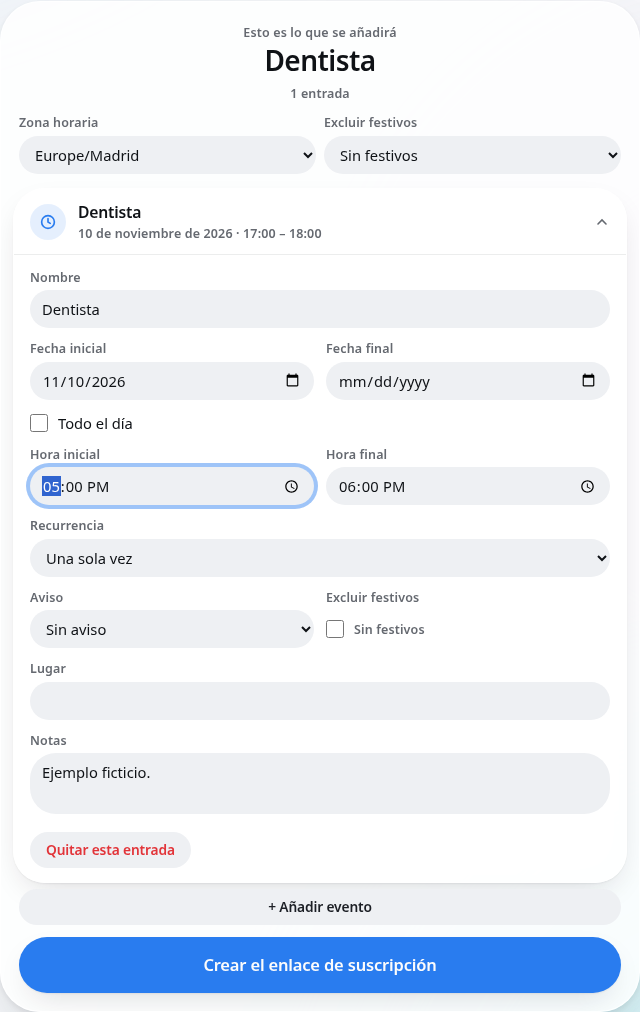
A single event on 10 October from 17:00 to 18:00, reviewable and editable before creating the calendar.
4
Subscription
Calendaro generated the calendar link. Apple Calendar recognised the address and showed its subscription settings screen. In that test we cancelled the final confirmation, so we do not claim a completed subscription here.
During that test we found that changing the start time in the review could leave the end time before the start. We fixed it: the duration is now kept and, if an event crosses midnight, that is clearly shown.
Product screenshot with fictional data: 10 November 2026, 17:00–18:00. Separate from the October case; no calendar was created or subscribed to.
When it helps
University timetables
Weekly classes with a term start and end date, skipping public holidays.
The calendar address is long and random: it works like a private address. Anyone who has it can see the events, so share it only with people you choose.
If you share it by mistake, you can revoke it from “My calendars”. The old link stops working immediately and a new one is created.
The image you upload is used to analyse the schedule. Calendaro keeps the events you review, not the conversation, and does not use it for advertising.
Not to create a calendar: an email is enough to receive the link. An account (email sign-in link, no password) lets you recover your calendars on another device.
Does Calendaro change my Google Calendar or iCloud?
No. It does not connect to your accounts. It creates a separate calendar that you subscribe to.
Can the AI get it wrong?
Yes. That is why every event goes through an editable review before the calendar is created, and you can edit it later.
How long until changes show up?
Calendaro publishes the change when you save. Each app decides when to check the link again: on Apple it is usually configurable; on Google it can take hours.
Can I edit the calendar later?
Yes, from “My calendars”. The link does not change when you edit.
What if I share the link by mistake?
Revoke it in “My calendars”: the old one stops working and you get a new one.
Do I need to install anything?
No. It works in the browser and uses the calendar app you already have.
Does it respect public holidays?
You can choose a country so recurring events skip its national holidays. Local holidays are worth double-checking.